> ## Documentation Index
> Fetch the complete documentation index at: https://docs.mcp-use.com/llms.txt
> Use this file to discover all available pages before exploring further.
# MCP 101
> The Model Context Protocol - architecture, primitives, and how mcp-use fits in
mcp-use is a fullstack MCP (Model Context Protocol) framework for Python and TypeScript.
**Install:**
* Python: `pip install mcp-use` (agent also requires a LangChain LLM provider, e.g. `pip install langchain-openai`)
* TypeScript: `npm install mcp-use`
**Core classes:** `MCPServer`, `MCPClient`, `MCPAgent`
**Key imports:**
* Python server: `from mcp_use import MCPServer`
* Python client/agent: `from mcp_use import MCPClient, MCPAgent`
* TypeScript server: `import { MCPServer } from "mcp-use/server"`
* TypeScript client/agent: `import { MCPClient, MCPAgent } from "mcp-use"`
## What is MCP?
AI models are powerful in isolation, but they can't act on the world without integrations - access to files, databases, APIs, browsers, and services. Traditionally, every team built these integrations from scratch, creating a fragmented ecosystem of one-off connectors.
The **Model Context Protocol (MCP)** is an open standard (introduced by Anthropic in late 2024) that solves this. It defines a common language between AI applications and the servers that expose capabilities to them - so any MCP-compatible client can talk to any MCP-compatible server without custom integration code. Build a server once, and it works with Claude, ChatGPT, Cursor, or any other MCP host.
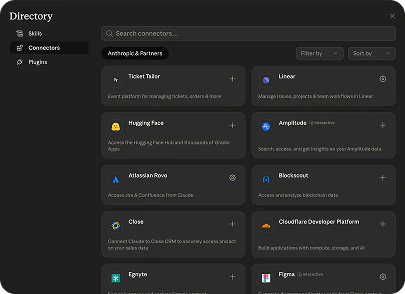
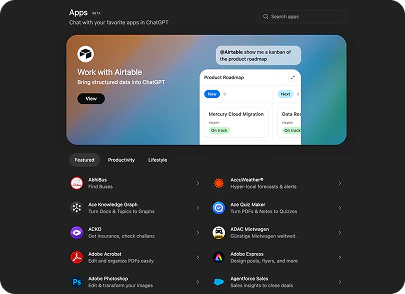
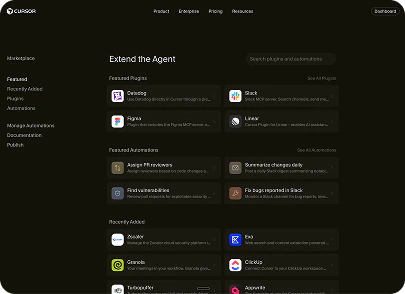
Chat interfaces are becoming how most products are used. The major AI platforms now ship official MCP stores where you can publish your server and reach users directly inside their chat interface - no app install, no separate login. Together, these platforms give you access to roughly **1 billion weekly active users**. Publishing on these stores is becoming one of the most powerful distribution channels for any product.
## Architecture
MCP uses a client-server model with three roles:
| Role | Responsibility |
| ---------- | -------------------------------------------------------------------------- |
| **Host** | The AI-powered application (your product, Claude Desktop, Cursor, ChatGPT) |
| **Client** | Runs inside the host; discovers and calls capabilities on MCP servers |
| **Server** | Exposes tools, resources, and prompts to any connected client |
```
Host
└─ Client ── Server A (filesystem, database, API...)
├─ Server B
└─ Server C
```
A single host can connect to many servers simultaneously. The client discovers what each server exposes, then routes requests to the right one.
## MCP Server
An MCP server exposes three primitives:
| Primitive | Controlled by | Purpose |
| ------------- | ------------- | -------------------------------------------- |
| **Tools** | Model | Functions the LLM calls to take actions |
| **Resources** | Application | Read-only data the client fetches on demand |
| **Prompts** | User | Reusable prompt templates and slash commands |
### Tools
The most common primitive. The model decides when to call a tool and with what arguments - the server executes it and returns a result.
```typescript TypeScript theme={null}
import { MCPServer, text } from "mcp-use/server";
import { z } from "zod";
server.tool({
name: "get_weather",
description: "Get weather for a city",
schema: z.object({ city: z.string() }),
}, async ({ city }) => {
return text(`Sunny, 22°C in ${city}`);
});
```
```python Python theme={null}
@server.tool()
def get_weather(city: str) -> str:
"""Get weather for a city"""
return f"Sunny, 22°C in {city}"
```
See [TypeScript Tools](/typescript/server/tools) and [Python Tools](/python/server/tools).
### Resources
Read-only data identified by a URI (`file:///example.txt`, `db://users/123`). The client application decides when to fetch them - not the model. Useful for surfacing context like file contents or query results.
```typescript TypeScript theme={null}
server.resource({
name: "app_config",
uri: "config://application",
description: "Current application settings",
}, async () => ({
contents: [{ uri: "config://application", text: '{"env":"production"}' }]
}));
```
```python Python theme={null}
@server.resource(uri="config://application", name="app_config")
def app_config() -> str:
"""Current application settings"""
return '{"env": "production"}'
```
See [TypeScript Resources](/typescript/server/resources) and [Python Resources](/python/server/resources).
### Prompts
Templated instructions the user can invoke (think slash commands). The server defines the template; the client presents it to the user.
```typescript TypeScript theme={null}
import { z } from "zod";
server.prompt({
name: "code_review",
description: "Generate a code review prompt",
schema: z.object({ language: z.string(), focus: z.string().default("general") }),
}, async ({ language, focus }) => ({
messages: [{ role: "user", content: `Review this ${language} code for ${focus}.` }]
}));
```
```python Python theme={null}
@server.prompt(name="code_review", description="Generate a code review prompt")
def code_review(language: str, focus: str = "general") -> str:
"""Generate a code review prompt"""
return f"Review this {language} code for {focus}."
```
See [TypeScript Prompts](/typescript/server/prompts) and [Python Prompts](/python/server/prompts).
### MCP Apps
**MCP Apps** is the official standard for interactive UI widgets in the MCP ecosystem. Instead of returning plain text, a tool returns a rendered widget - a React component that runs directly inside Claude, ChatGPT, or any MCP-compatible client. Write the widget once and it works everywhere.
```typescript theme={null}
import { MCPServer, widget } from "mcp-use/server";
import { z } from "zod";
server.tool({
name: "get_weather",
description: "Get weather for a city",
schema: z.object({ city: z.string() }),
widget: "weather-display", // references resources/weather-display/widget.tsx
}, async ({ city }) => {
return widget({
props: { city, temperature: 22, conditions: "Sunny" },
message: `Weather in ${city}: Sunny, 22°C`,
});
});
```
Widgets live in a `resources/` folder and are auto-discovered - no manual registration needed. They communicate with the server over JSON-RPC and have full access to MCP tools and resources from the client side.
Widgets, auto-discovery, props, and client-side hooks.
Step-by-step: scaffold and ship your first widget.
Understand how MCP Apps run in ChatGPT.
Use the Inspector to test and debug your widgets.
## MCP Client
Any application that speaks the MCP protocol is an MCP client - Claude Desktop, Cursor, ChatGPT, or your own product. Clients connect to servers, list their capabilities, and call tools on behalf of the model or user.
The **[MCP Inspector](/inspector/index)** is a good concrete example: it is an MCP client that connects to any server and lets you browse tools, call them manually, inspect resources, and monitor the protocol exchange in real time. It ships built-in with every mcp-use server at `/inspector`.
With mcp-use, `MCPClient` gives you a programmatic MCP client in Python and TypeScript:
```typescript TypeScript theme={null}
import { MCPClient } from "mcp-use";
const client = new MCPClient({
mcpServers: {
everything: { command: "npx", args: ["-y", "@modelcontextprotocol/server-everything"] }
}
});
await client.createAllSessions();
const session = client.getSession("everything");
const tools = await session.listTools();
const result = await session.callTool("add", { a: 1, b: 2 });
await client.closeAllSessions();
```
```typescript React theme={null}
import { useMcp } from "mcp-use/react";
const { tools, callTool } = useMcp({
url: "http://localhost:3000/mcp"
});
const result = await callTool("add", { a: 1, b: 2 });
```
```python Python theme={null}
from mcp_use import MCPClient
client = MCPClient({
"mcpServers": {
"everything": { "command": "npx", "args": ["-y", "@modelcontextprotocol/server-everything"] }
}
})
await client.create_all_sessions()
session = client.get_session("everything")
tools = await session.list_tools()
result = await session.call_tool("add", {"a": 1, "b": 2})
await client.close_all_sessions()
```
See [TypeScript Client](/typescript/client/index) and [Python Client](/python/client/client-configuration).
### Client Primitives
Clients can also implement primitives that reverse the flow - the server initiates a request back through the client:
| Primitive | Flow | Purpose |
| ----------------- | ------------------- | ------------------------------------------------- |
| **Sampling** | Server - LLM | Server asks the client to run an LLM completion |
| **Elicitation** | Server - User | Server asks the user for input mid-workflow |
| **Roots** | Server - Filesystem | Server requests access to specific paths |
| **Notifications** | Server - Client | Server sends real-time progress or status updates |
See [Sampling](/typescript/client/sampling), [Elicitation](/typescript/client/elicitation), and [Notifications](/typescript/client/notifications).
## MCP Agent
An MCP Agent wraps an LLM around an MCP client: the model reasons about a task, selects tools, calls them, and iterates until done. mcp-use ships a full agent implementation for Python and TypeScript built on LangChain.
```typescript TypeScript theme={null}
import { MCPAgent, MCPClient } from "mcp-use";
import { ChatOpenAI } from "@langchain/openai";
const client = new MCPClient({
mcpServers: {
playwright: { command: "npx", args: ["@playwright/mcp@latest"] }
}
});
const agent = new MCPAgent({ llm: new ChatOpenAI({ model: "gpt-5.5" }), client });
const result = await agent.run({ prompt: "Find the best restaurant in San Francisco" });
await client.closeAllSessions();
```
```python Python theme={null}
from mcp_use import MCPAgent, MCPClient
from langchain_openai import ChatOpenAI
client = MCPClient({
"mcpServers": {
"playwright": { "command": "npx", "args": ["@playwright/mcp@latest"] }
}
})
agent = MCPAgent(llm=ChatOpenAI(model="gpt-5.5"), client=client)
result = await agent.run("Find the best restaurant in San Francisco")
await client.close_all_sessions()
```
See [Python Agent](/python/agent/agent-configuration) and [TypeScript Agent](/typescript/agent/index).
***
## Resources
Ready to build? Pick where you want to start - whether that's exposing your first tool, embedding a widget in Claude, or connecting to an existing server programmatically. Each section of the docs has quickstarts, API references, and examples to get you running fast.
For a deep dive into the protocol itself, see the [official MCP documentation](https://modelcontextprotocol.io/docs/getting-started/intro).
Expose tools, resources, and prompts to any AI client.
Interactive widgets that run in Claude and ChatGPT.
Test and debug your MCP server in the browser.
Connect to any MCP server programmatically.
AI agents that use MCP servers to complete tasks.
Runnable samples for Python and TypeScript.
***
## Contacts
**Get in touch**
* Email: [founders@mcp-use.com](mailto:founders@mcp-use.com)
* Book a meeting: [https://cal.com/mcp-use/founders](https://cal.com/mcp-use/founders)
**Socials**
* LinkedIn: [https://www.linkedin.com/company/mcp-use](https://www.linkedin.com/company/mcp-use)
* X: [https://x.com/manufact](https://x.com/manufact)
* Discord: [https://discord.gg/XkNkSkMz3V](https://discord.gg/XkNkSkMz3V)
**Founders**
* Pietro Zullo: [https://www.linkedin.com/in/pietrozullo/](https://www.linkedin.com/in/pietrozullo/)
* Luigi Pederzani: [https://www.linkedin.com/in/luigipederzani/](https://www.linkedin.com/in/luigipederzani/)