

landing.tsx file to your MCP root to replace that page with your own React component. Without landing.tsx, mcp-use serves the built-in page.
When the landing page is shown
mcp-use serves the landing page forGET and HEAD requests to the MCP URL (such as http://localhost:3000/mcp) whose Accept header names text/html. Browsers send that header when you open the URL. MCP clients do not, so their requests reach the MCP handler as usual.
If the server uses OAuth, the landing page HTML, including the hook data in it, requires a valid bearer token like any other request. Set publicLandingPage: true on MCPServer to serve it without one. Servers with mixedAuth: true already serve it without a token. MCP requests stay protected either way.
The page’s compiled JavaScript and CSS under /_mcp-use/landing/ are always public, so do not put secrets in landing.tsx. Read server data through the hooks instead.
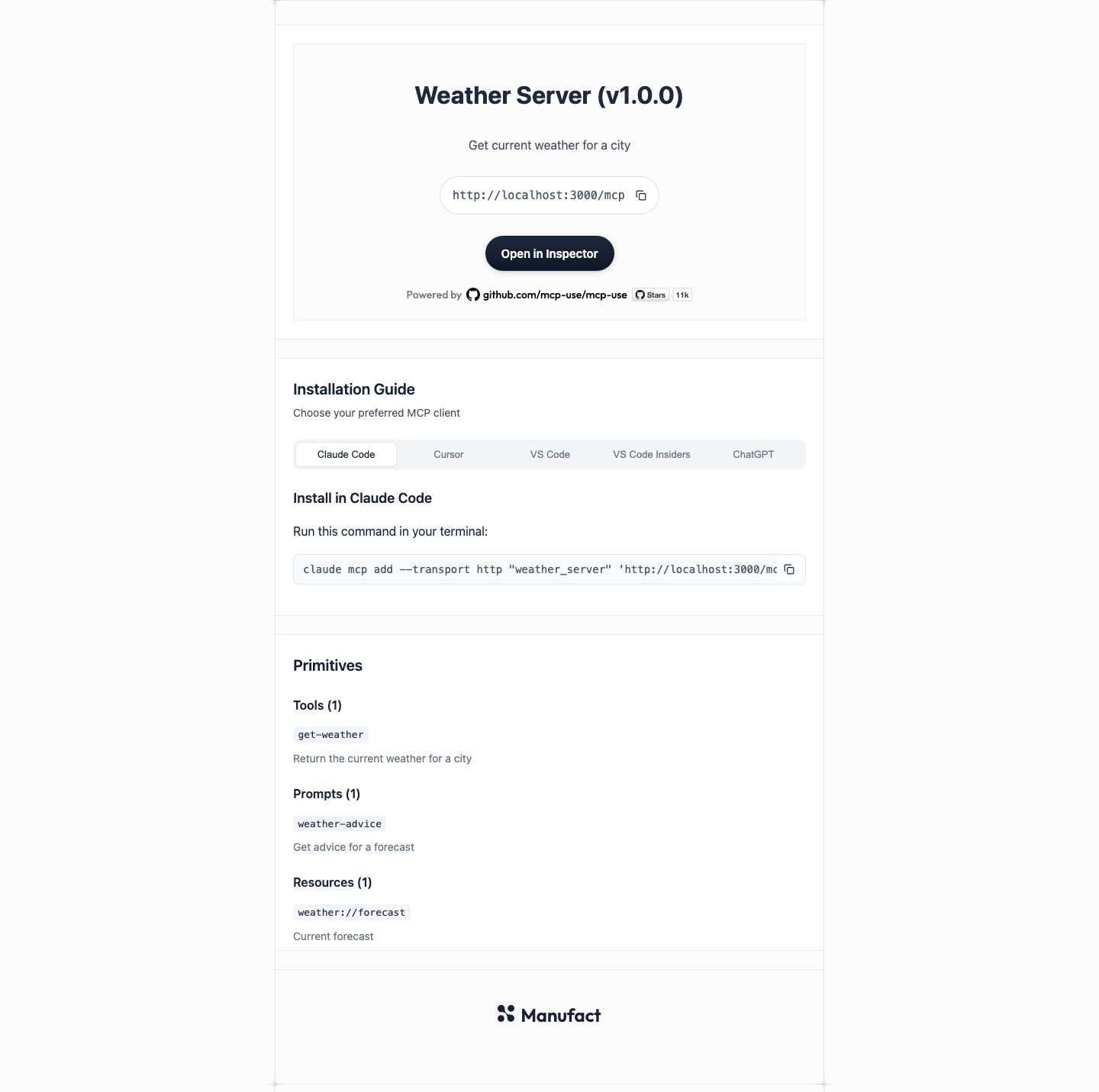
The built-in page looks like this for a sample Weather Server with one tool, prompt, and resource:
Create landing.tsx
Projects created withcreate-mcp-use-app already include a landing.tsx. It is styled with Tailwind classes and resembles the built-in page. Edit it, or delete it to go back to the built-in page.
To add one to an existing project, put landing.tsx next to your server entry:
"jsx": "react-jsx" in tsconfig.json and add "**/landing.tsx" to its include array.
The default export of landing.tsx must be a React component. It returns the page body content. mcp-use supplies the HTML document, the <head> tags, the favicon, and the hydration script.
landing.tsx
mcp-use dev and open the MCP URL in a browser to see the page.
For a complete page with client tabs, copy buttons, and a gradient header, start from the scaffold’s landing.tsx.
Server rendering and hydration
mcp-use renders the component to HTML on the server with React’s synchronousrenderToString, then hydrates it in the browser so state, effects, and event handlers work. Keep browser-only code, such as window, navigator.clipboard, and event listeners, inside effects and event handlers.
Read server data with hooks
Import these hooks frommcp-use/landing and call them from any component rendered by landing.tsx:
Calling a hook outside a component rendered by
landing.tsx throws useServerInfo() was called outside the landing page. (with the hook’s name).
LandingServerInfo has these fields:
Tools and prompts have
name, an optional title, and an optional description. Resources have uri, and optional name, title, and description.
Which lists ship to the page
mcp-use writes the hook data into the HTML as JSON so the browser can hydrate. Server info is always included. Each list is included only when your page imports its hook:toolsships when a module importsuseToolListfrommcp-use/landing.promptsships when a module importsusePromptList.resourcesships when a module importsuseResourceList.
mcp-use dev:
- Every module in your
landing.tsximport graph counts, including modules loaded with dynamicimport(). import typedoes not count.- A namespace import (
import * as landing from "mcp-use/landing") orexport * from "mcp-use/landing"ships all three lists. - Imports inside installed packages in
node_modulesdo not count. If a component library calls a list hook, also import that hook in your own code.
useToolList() has no data. Import it in a module under landing.tsx. (with the hook’s name). Import the hook directly from mcp-use/landing in one of your modules to fix it.
Show install links
useInstallTargets() returns one entry per client, keyed by client. Each entry has a label and one field that depends on how the client installs a server:
The keys are in display order.
Object.values(useInstallTargets()) lists the clients in the order of the built-in page’s tabs, with Manufact Inspector last. Check which field an entry has to render it:
Set the page title and preview tags
Export ametadata object from landing.tsx to set the document <title>, meta description, and Open Graph and Twitter tags:
Every field is optional, and a missing or empty field keeps its default.
icon and image accept an absolute URL or a path in the project’s public/ directory, such as "og.png". mcp-use HTML-escapes every value.
metadata must be a plain object. mcp-use reads it once when the module loads, so it cannot change per request. A field that is not a string is ignored, and the server logs a warning that starts with [mcp-use] landing.tsx metadata:.
Style the page
Tailwind classes work inlanding.tsx with no setup. The page loads the same CLI-managed Tailwind stylesheet as MCP Apps views. That stylesheet includes Tailwind’s preflight reset, which removes browser defaults such as list markers and paragraph margins.
You can also import CSS files. Vite bundles them with the page, and they load after Tailwind, so your rules win where both set a property:
public/ directory, prefix its path with publicBaseUrl:
Dark mode
The page setsdata-theme="dark" or data-theme="light" on <html> from the visitor’s OS color scheme before the first paint, and updates it when the OS setting changes. Tailwind’s dark: variant follows data-theme, so dark: classes work with no setup:
document.documentElement.dataset.theme yourself. Once the page changes the value, mcp-use stops updating it from the OS.
Customize Tailwind
To add theme tokens, utilities, or your owndark variant, import Tailwind in the page’s CSS. You don’t need to install tailwindcss:
landing.css
@import "tailwindcss", the page owns Tailwind: mcp-use leaves out its managed stylesheet, so only your copy is compiled. Your dark variant, if you define one, is then the only one.
Develop the page
mcp-use dev serves the page with hot reloading:
- Fast Refresh. Edits to the component update the open page and keep React state. CSS edits apply immediately.
- New list hooks. When an edit imports a list hook the open page did not ship, the page reloads to fetch the new list.
- Live add and remove. Creating
landing.tsxwhile dev is running switches the open page from the built-in page to yours. Deleting it switches back. Each switch reloads the tab. - Last working page. If an edit breaks the module, for example with a syntax error or a missing default export, mcp-use keeps serving the last version that loaded and logs
[mcp-use] landing update failed; serving last working pagewith the error.
Build and deploy
mcp-use build bundles the page with your server into .mcp-use/build/, and mcp-use start serves the built page. start does not look for source files. If you add or remove landing.tsx, build again.
In production, mcp-use renders the HTML once for each MCP URL and asset origin and reuses it for later requests.
Server entry in a subdirectory
mcp-use looks forlanding.tsx in the MCP root: the project root, or the directory you pass with --mcp-dir. The public/ directory stays at the project root.
src/mcp/landing.tsx.
Serve page assets from a CDN
SetMCP_ASSETS_URL when you build to load the page’s JavaScript and CSS from a CDN. The build rewrites the asset URLs and prints which directory to publish:
.mcp-use/build/landing/ at <MCP_ASSETS_URL><basePath>/_mcp-use/landing/, for example https://cdn.example.com/acme/mcp/_mcp-use/landing/. With the root basePath /, the path is <MCP_ASSETS_URL>/_mcp-use/landing/. The build log prints the exact URL.
Set MCP_ASSETS_URL when the server runs too, so publicBaseUrl points at the same CDN. In that case, also publish the project’s public/ directory at <MCP_ASSETS_URL><basePath>/_mcp-use/public/. Otherwise publicBaseUrl links and the metadata icon and image paths return 404. See the CLI reference for how MCP_ASSETS_URL applies to views.
Use install links on another site
getInstallTargets() builds the same install links without a running server, so a docs site or marketing page can show them. mcp-use/landing does not import React or Node.js built-ins, so it runs in Node.js, edge runtimes, and browsers.
Pass the MCP URL and the server name. useInstallTargets() passes the server’s title ?? name, so pass the same value to match the links on your landing page:
app/install/page.tsx
getInstallTargets() in a build script and write the values into your docs.